Guide for Fleet Managers#
Keeping vehicles, requests, licence checks, hand-overs, inspections and costs.
A Fleet Manager looks after a community's vehicles and the requests to use them. You report to the Program Manager. You sign in with a password and an authenticator code.
What you can do#
- Keep a list of vehicles, their service plans, readings and costs.
- Decide requests from volunteers for a vehicle: check the licence, approve, hand over and inspect.
- Raise fleet work tickets for the Program Manager to approve.
Fleet#
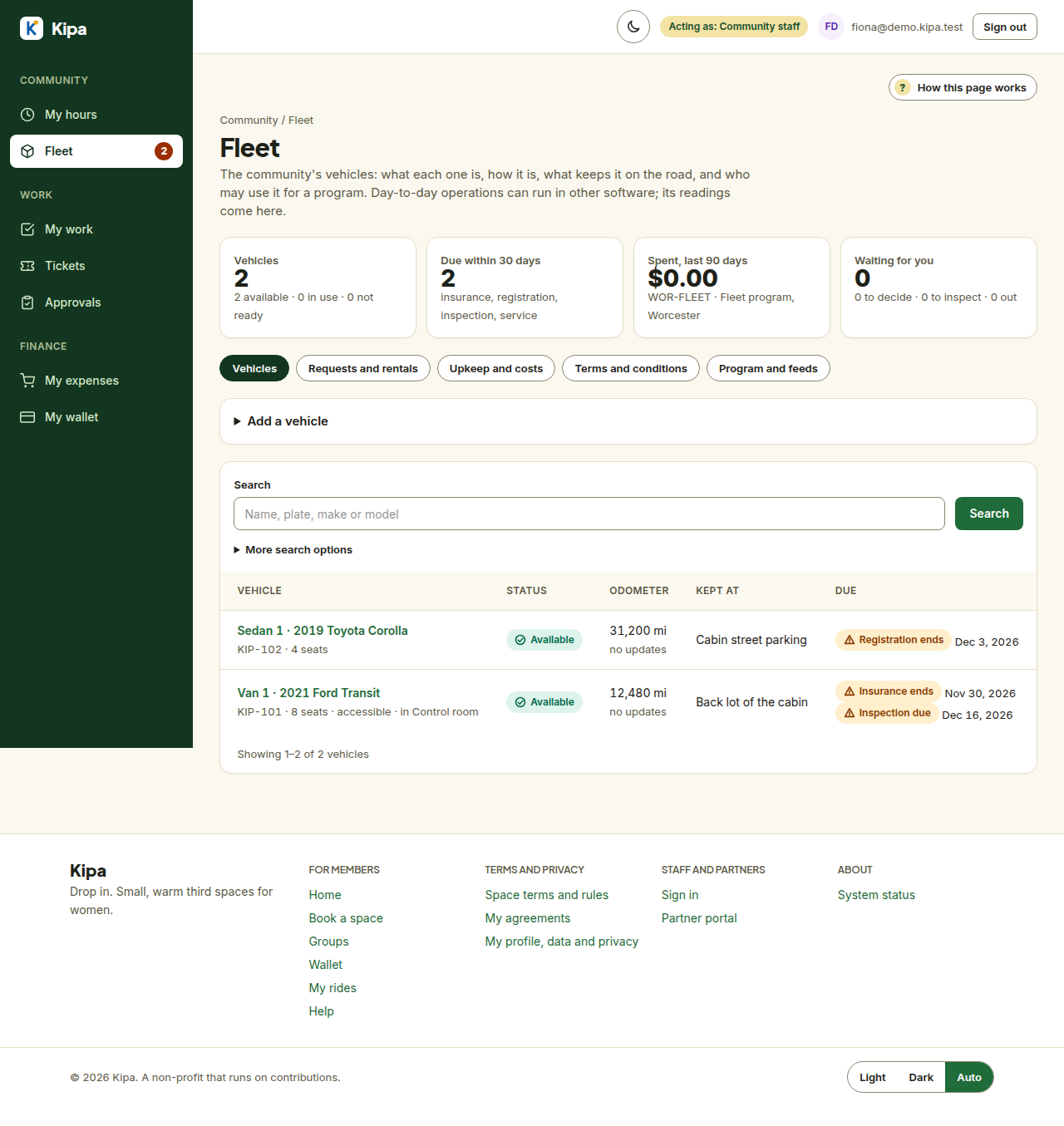
Fleet shows tiles (vehicles, due within 30 days, spent in 90 days, requests waiting) and the vehicle list with status, odometer, where it is kept and due dates. A number on the menu counts due items and open reports.
Add a vehicle#
- Press Add a vehicle: name, make, plate, seats, insurance and registration dates. It is listed.
- Open it: details, due items, service plans, history and costs.
- Add a service plan (for example oil change every 5,000 miles or 180 days) and press Done today when it is done. The history gets a Service entry.
- Record a reading (odometer, a note) and a cost (for example $84.20, tires). The odometer moves forward, never back.
- For upkeep, press Raise a fleet work ticket with an estimate. It waits for the Program Manager. A Community Lead does not see it in approvals.
A request for a vehicle#
A volunteer asks for a vehicle under My vehicles: the goal, start and return times. A start in the past, a return before the start, or more than 14 days is refused. They must accept the vehicle terms.
- Open Fleet, Requests and rentals. The newest request is on top. Open it: the request and a Before it goes out checklist (licence, terms, insurance, registration, papers, cost center, roadside help, gas card).
- Record a licence check: result Valid, an end date, and tick that the driver agreed. Without the consent tick, it is refused. A Suspended result is saved but does not allow approval. You cannot approve with no licence check.
- Approve and set the terms: the most miles (for example 60), a gas card, and tick insurance papers. A cost center left empty uses the fleet cost center. Another request for the same van and hours cannot be approved (it is booked). The driver is told and sees the pickup, return, miles, gas card, roadside help and conditions.
- Pick up and Hand over the keys. Both need the papers ticked and the driver's accepted terms. Then the van shows In use and the gas card With a driver.
- When it comes back the van is Available and the request shows To inspect, with miles over the limit and any lateness. A problem the driver reported is a ticket for you.
- Return inspection. Choose the result. Minor damage needs a note. The rental closes and the ticket is resolved. Unsafe takes the van out of service.
- Record the costs of the rental (for example fuel $35). They count against its cost center.
Cancel and decline: a driver can cancel a request that is waiting. You can decline with a reason, which the driver reads.
Program and feeds#
- Write and publish the terms and conditions. The published version shows how many volunteers accepted it. Editing starts a new draft that is not seen until published.
- Add gas cards (last four digits) and roadside help. Roadside help is copied onto new approvals.
- Feed token. Make a token for another tool to send readings to Kipa. It is shown once. Readings appear on the vehicle with "from other software". A wrong token is refused. You can also paste readings (vehicle, odometer_miles, fuel_pct, location).
- The fleet cost center is set by the Program Manager; you and Community Leads cannot change it.
If something goes wrong#
| You see | What to do |
|---|---|
| "Record a valid licence check first" | Add the licence check before approving |
| A hand-over is refused | Tick the papers and wait for the driver to accept the terms |
| A Community Lead cannot approve | Only you (and the Program Manager for tickets) can |